

Summarize This Article With AI
 Try with ChatGPT
 Try with Claude
 Try with AI Mode
So you’ve built a website. You’ve written the content, designed the pages, maybe even sprinkled in some keywords. Traffic is… fine.
Not great, not terrible. Fine.
Then you run a crawl. And you discover pages Google hasn’t touched in months. Navigation that makes zero logical sense. A URL structure that looks like it was designed by someone who really hated both users and robots.
Sound familiar? You’re not alone.
Most businesses obsess over content and backlinks while completely ignoring the foundation that determines whether any of it works. Website architecture is that foundation.
Get it right, and everything works better: search engines crawl faster, users find things quicker, and pages rank higher. Get it wrong, and you’re essentially building on sand.
Here’s what you need to know.
Article Summary
- Website architecture is the way your pages are organized, connected and navigated across your site
- Good information architecture improves crawlability, indexing, user experience and link equity distribution
- A flat architecture means fewer clicks from the homepage to any page, which Google loves
- Building architecture around topic clusters and content pillars supercharges topical authority
- Technical elements like XML sitemaps, canonical tags and robots.txt are not optional extras
- Common mistakes include orphan pages, duplicate content paths and inconsistent navigation menus
- Tools like Screaming Frog, Ahrefs and Semrush make auditing your website structure far less painful
What Is Website Architecture?
Website architecture is the way your site’s pages are organized, linked together and presented to both users and search engines.
Think of it like a building. The homepage is the lobby. Your main service or category pages are the floors. Individual blog posts, product pages or sub-service pages are the rooms. A well-designed building lets visitors get anywhere quickly, without getting lost in a maze of corridors.
A poorly designed one? Dead ends. Staircases to nowhere. Rooms nobody ever finds.
In practical terms, website architecture covers:
- How your pages are categorized using a clear content hierarchy
- How they connect to each other through internal links
- How your navigation menu and global navigation are structured
- How your URL structure is formatted
- How search engines and users move through the site
It’s not just a technical concern. Architecture is a user experience decision and a search engine optimization strategy rolled into one.
When someone lands on your homepage, the information architecture determines how fast they find what they’re looking for. When Googlebot visits your site, the website structure determines which pages get crawled, how often, and how much authority flows to each.
Both matter enormously.

Website Architecture vs Information Architecture
These two terms often get confused, so let’s clear it up.
Information architecture (IA) is the broader discipline of organizing and labeling content so users can find and understand it. It includes content labeling, navigation systems, content organization and the logic behind how things are grouped.
Website architecture is the technical implementation of that logic. It’s how the information architecture gets built into the actual site, through URL structures, internal links, navigation menus and site hierarchy.
Think of IA as the blueprint and website architecture as the construction.
Getting both right matters. A beautiful information architecture that’s poorly implemented technically still results in crawlability problems and poor rankings. A technically sound architecture built on poorly organized content still confuses users and signals low quality to search engines.
Why Website Architecture Matters
Good website architecture matters because it directly affects how search engine crawlers access your site, how link equity flows across your pages and how easily users can find what they’re looking for.
That’s three things at once. Let’s break them down.
Simplicity and Scalability
A well-structured site is easy to navigate today and easy to expand tomorrow.
Simplicity means a user can land on your homepage and reach any key page within a handful of clicks. It means your navigation menu isn’t cluttered with 40 options. It means the content hierarchy makes intuitive sense.
Scalability means that when you add 50 new blog posts or launch a new service, they slot neatly into the existing structure. No scrambling to retrofit a sensible taxonomy. No orphaned pages floating in the void with no internal links pointing to them.
Sites that skip this upfront thinking tend to end up with what I call “structural debt.” Everything looks fine from the outside. Underneath, it’s chaos.
Logical Hierarchy
A logical, hierarchical structure organizes your content from broad to specific.
At the top: your homepage and main content pillars. Below that: category pages and topic-level hubs. Below those: individual articles, products or service sub-pages.
For a law firm, a logical content hierarchy might look like this:
- Homepage → Practice Areas → Family Law → Child Custody Attorneys
- Homepage → Blog → [Individual Articles]
For an e-commerce store:
- Homepage → Women’s Clothing → Dresses → Maxi Dresses
Each level narrows the focus. Each page sits in a logical place within the overall hierarchical structure. Users know where they are. Search engines understand the relationship between pages.
Without this hierarchy, you end up with pages that don’t clearly belong anywhere. And pages that don’t belong anywhere tend not to rank.
Shallow (Flat) Architecture vs Deep Architecture
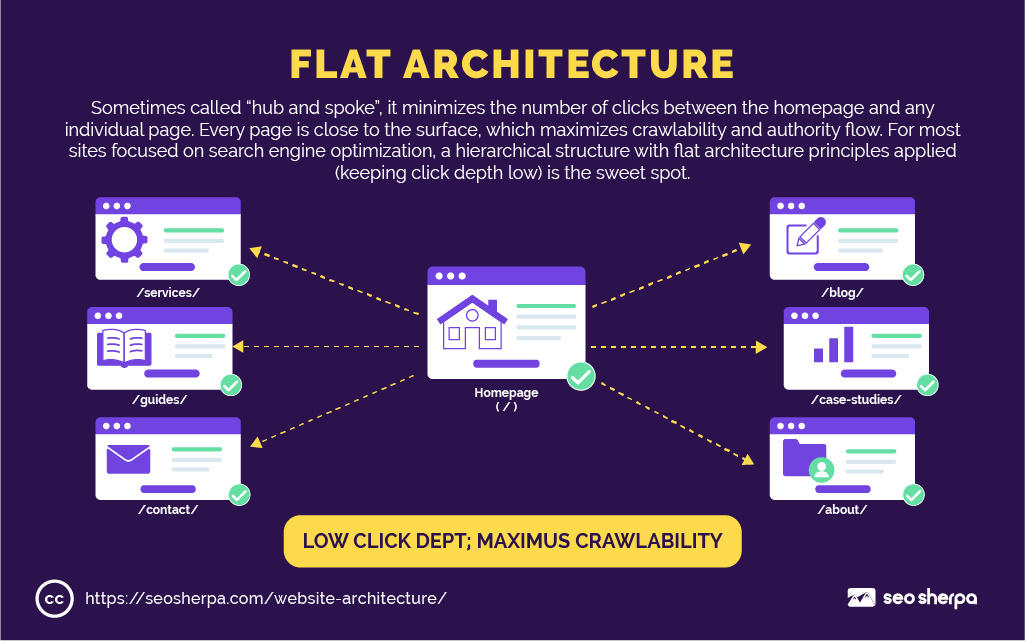
A flat architecture keeps the most important pages close to the homepage, meaning fewer clicks to reach them. Deep architecture buries pages many levels down, requiring users and search engine crawlers to navigate through multiple layers before reaching them.
Here’s why click depth matters: Google distributes PageRank (authority) through internal links. The further a page is from the homepage, the less authority tends to flow to it. A page that’s five clicks deep from the homepage is signaling, intentionally or not, that it’s less important.
Flat architecture example: Homepage → /blog/keyword-research-guide/ (2 clicks)
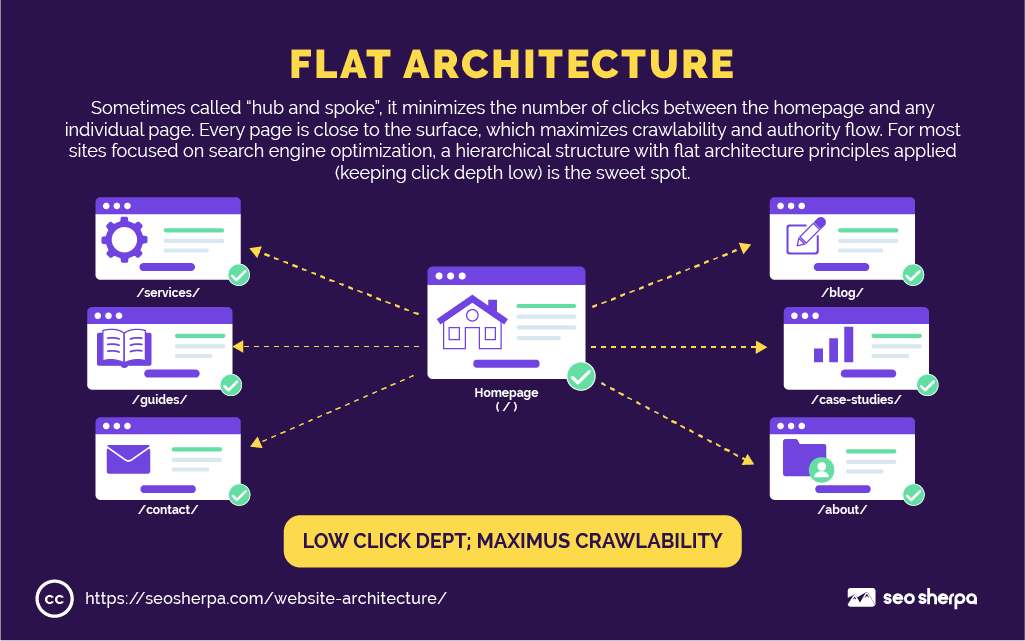
Deep architecture example: Homepage → /resources/ → /resources/seo/ → /resources/seo/guides/ → /resources/seo/guides/keyword-research/ (5 clicks)

Both pages contain the same content. But the one with lower click depth gets more crawl frequency, more PageRank and generally ranks better.
The goal is to keep every important page reachable within three clicks of the homepage.
Flat architecture also benefits your crawl bandwidth. Search engines allocate a limited crawl budget to each site. A flat structure means search engine crawlers can access more pages in fewer hops, spending that budget efficiently rather than wasting it navigating unnecessary subfolder layers.
Internal Linking Best Practices
Internal linking is how you actively shape the flow of authority across your site.
Every internal link is a vote. It tells both users and Google: “This page is relevant and worth visiting.” Done strategically, internal linking can elevate underperforming pages, reinforce topic clusters and distribute link equity exactly where you want it.
Here are the core principles:
Use descriptive anchor text. Instead of “click here,” link using phrases that describe the destination. “Learn how to build internal links for SEO,” tells Google far more than a generic link.
Link from high-authority pages. Your most linked-to pages have the most PageRank to pass on. Place internal links on those pages pointing toward the pages you most want to rank.
Don’t leave pages orphaned. Orphan pages have no internal links pointing to them. If search engine crawlers can’t reach a page via a link, it may not get crawled. And if it doesn’t get crawled, it won’t rank.
Link contextually, not randomly. Links placed within relevant body content carry more weight than footer navigation links or sidebar links. Relevance matters.
Think about your navigation systems holistically. Top-level navigation, section navigation, local navigation, breadcrumb navigation and footer navigation all pass authority. Understanding how each layer works helps you design a linking architecture that supports your SEO goals across the entire site.
Types of Website Architecture
Not all site structures are built the same way. Understanding the main architectural patterns helps you choose the right approach for your goals.
Hierarchical Architecture
It is the most common model. Pages are organized in a tree structure from broad to specific, with the homepage at the top and individual pages branching below. It works well for most business sites, blogs and service companies.

Sequential Architecture
This one guides users through a fixed content path, one step at a time. Common in onboarding flows, course platforms and checkout processes where order matters.

Matrix Architecture
This lets users navigate via multiple pathways: tags, categories and cross-links rather than a fixed hierarchy. Encyclopedias and large knowledge bases often use this approach.

Flat Architecture
Sometimes called “hub and spoke,” it minimizes the number of clicks required to get from the homepage to any individual page. Every page is close to the surface, which maximizes crawlability and authority flow.
For most sites focused on search engine optimization, a hierarchical structure with flat-architecture principles (keeping click depth low) is the sweet spot.
Steps to Build SEO-Friendly Website Architecture
Building solid website architecture isn’t something you do after everything else. It’s the blueprint you work from. Here’s how to approach it step by step.
Conduct Keyword Research for Core Pages
Every page in your architecture should exist for a reason. That reason should be backed by keyword data and search intent.
Start with your most important topics. What are the core things your business does or offers? What would your ideal customer type into Google? Use tools like Ahrefs, Semrush or Google Search Console to identify which keywords have real search volume.
Each significant keyword cluster becomes a candidate for its own page or section. If you’re a cybersecurity company, “penetration testing,” “SOC services” and “cloud security” might each warrant their own content pillar pages. If you’re a blog, broad topics like “SEO,” “content marketing” and “link building” might be your top-level hubs.
Search intent matters here, too.
A keyword with informational intent belongs on a blog or guide page. A keyword with transactional intent belongs on a service or product page. Getting this wrong means publishing content that doesn’t match what users actually want, which hurts both rankings and bounce rate.
The architecture follows the keywords. Not the other way around.
Map Content Into Topic Clusters and Silos
Once you know your keywords, group them into topic clusters using the pillar-cluster model.
A content hub has one cornerstone content piece (a broad, authoritative pillar page on a core topic) surrounded by cluster content (more specific articles that link back to the pillar). The pillar links out to the cluster pages. The cluster pages link back to the pillar. Google sees a web of related, interconnected content and concludes you know your subject well.
The pillar-cluster model is one of the most powerful approaches to semantic SEO available. It builds topical authority, improves crawlability and creates a content organization system that scales cleanly as you publish more.
A topic silo takes this further. In a true silo structure, content within one topic group links primarily to pages within the same topic group. This keeps semantic signals focused and reinforces your site’s authority on a given subject.
For example, an SEO agency might have a content hub for “technical SEO” that includes a pillar page and individual cluster articles on XML sitemaps, robots.txt, canonical tags, crawl bandwidth and page speed. All these pages link to each other, reinforcing the topic cluster.
Design a Hierarchical Navigation System
Your navigation menu is the visible face of your architecture.
Top-level navigation should reflect your most important categories or service areas. Section navigation and local navigation help users move within a specific topic area. Footer navigation handles secondary pages like privacy policies, contact pages and sitemaps. Global navigation ties all of these together consistently across every page.
Keep it simple.
A navigation menu with 8 top-level items and 40 sub-items is overwhelming for users and dilutes the authority signals those links pass. Every link in your navigation passes PageRank. Fewer, more strategic links pass more.
A useful UX research method worth knowing here is card sorting. Card sorting is a technique where users organize topics into groups that make sense to them. It’s particularly valuable when you’re designing navigation for a large, complex site and you’re not sure how to structure your top-level navigation categories. Running a card sort before building your navigation can prevent architecture decisions that frustrate users later.
Test your navigation with fresh eyes. Can someone land on your homepage with no prior knowledge and find what they need within 10 seconds? If not, it needs work.
Mobile navigation deserves equal attention. Responsive design means your navigation must work across all screen sizes. Navigation menus that collapse awkwardly or section navigation that’s hard to tap on small screens create friction that drives up bounce rate and signals poor user experience to Google.
A useful self-check: can a user on a mobile device access your top-level navigation, drill down to a category page and reach the content they need in three taps or fewer? That’s the benchmark.
Optimize URL Structures
Your URL structure is a map. It should tell users and search engines exactly where a page sits within your site.
A well-structured URL looks like this: yoursite.com/topic/sub-topic/page-title
A poorly structured one looks like this: yoursite.com/p=12847?cat=3&ref=sidebar
The principles for clean, SEO-friendly URLs are:
- Use hyphens to separate words, not underscores
- Keep URLs as short and descriptive as possible
- Include the primary keyword naturally
- Use lowercase throughout
- Avoid unnecessary parameters, dates or IDs
- Limit subfolder depth to a maximum of three levels
The URL structure should mirror your content hierarchy. If your site structure places a blog post under a “technical SEO” category page, the URL should reflect that: /technical-seo/website-architecture/ rather than a flat /website-architecture/ with no context.
This matters for both user experience and for content organization signals sent to search engines. When a user sees a URL, they should immediately understand where they are on the site.
Build Smart Internal Links
With your architecture planned, internal linking is how you activate it.
Go beyond navigation menus. Every blog post, service page and landing page should contain contextual internal links pointing to related content. These links guide users deeper into your site and pass PageRank to the pages you most want to rank.
Prioritize linking from high-traffic pages to high-conversion pages. Use Google Analytics or Search Console to identify where your traffic lands and where your conversions happen. Then connect them deliberately.
Don’t forget your HTML sitemap either. An HTML sitemap linked from your footer passes PageRank from every page on your site to the pages it links to. It’s not just a user experience tool; it’s an authority distribution mechanism.
Revisit your internal links regularly. As you publish new content, older pages should be updated to link to it. New pages left without internal links become orphan pages by default, which is one of the most common and preventable architecture mistakes.

Use Breadcrumbs for Navigation
Breadcrumbs are the small navigational trail you see at the top of pages:
Home → Blog → Technical SEO → Website Architecture
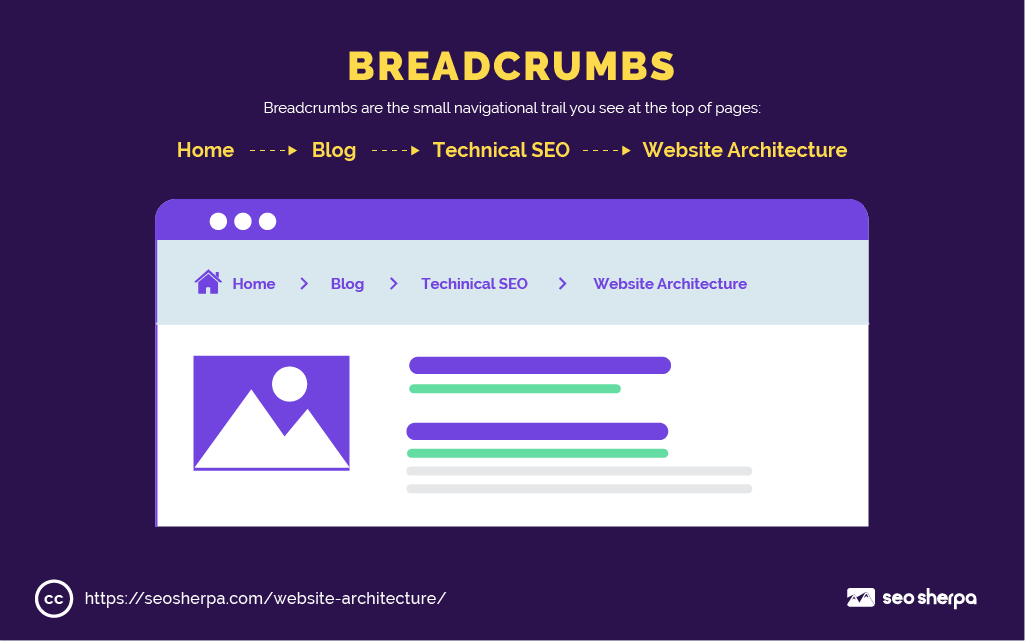
Breadcrumb navigation serves multiple purposes. It helps users understand where they are within your content hierarchy and navigate back up to broader sections if needed. It passes link equity automatically to each level of the hierarchy as new pages are added. And it improves your appearance in Google search results, since breadcrumb trails often display in place of the raw URL in SERPs.
Once breadcrumb navigation is implemented, every new page you create automatically inherits it. No manual linking required.
For e-commerce sites with deep category pages and content-heavy blogs with large topic cluster structures, breadcrumbs are particularly valuable. They reduce bounce rate, improve the user flow through your site, and signal a logical hierarchical structure to Google.
Schema markup for breadcrumbs is worth adding, too. Structured data helps search engines explicitly understand your breadcrumb hierarchy rather than having to infer it, which improves the consistency of breadcrumb display in search results.
Technical Considerations
Good architecture needs technical support. Here’s where the mechanics of crawling and indexing come in.
XML Sitemaps and Robots.txt
An XML sitemap is a file that lists all the URLs on your site that you want Google to find and index. Think of it as a table of contents for search engine crawlers.
A well-configured XML sitemap includes only URLs that return a 200 status code. No redirected pages, no canonicalized duplicates, no noindex URLs. Just the clean, indexable pages you want Google to prioritize.
An HTML sitemap is different. It’s a user-facing page that lists your site’s content in a structured, navigable format. It helps users find content and helps search engines understand your content organization at a glance. Both have a role to play in a well-built site.
Your robots.txt file works alongside the sitemap. It tells crawlers which sections of your site they’re allowed to access and which they should skip. Used correctly, it protects crawl bandwidth and stops crawlers wasting time on admin areas, duplicate parameter URLs or staging environments.
The relationship between the two is important: If a URL is in your XML sitemap, it should not be blocked by robots.txt. If it is, you’re sending contradictory signals to Google.

Canonical Tags
Canonical tags tell Google which version of a page is the “master” version.
This becomes critical when the same or very similar content exists at multiple URLs.
E-commerce sites are especially vulnerable: faceted search (filtering by size, color, price range) can generate hundreds of near-identical URLs from a single category page. Without canonical tags, Google sees all of these as separate pages competing for the same search intent.
Without canonical tags, Google has to decide which version to rank. It often gets this wrong. The result is diluted authority spread across multiple URLs and inconsistent rankings.
A canonical tag on the duplicate pages pointing to the primary URL consolidates that authority. It tells Google to “ignore these variants, this is the page I want in the index.”
Canonicals also matter when syndicating content. If your article appears on another site, a canonical link pointing back to your original URL helps protect your ranking.

Mobile-First Architecture
Google indexes your site based on the mobile version. Not the desktop version. The mobile version.
This means your mobile experience isn’t a secondary consideration. It’s the primary one.
Mobile-first architecture means:
- Responsive design is implemented correctly across all UI components and the user interface
- Navigation menus are usable on touchscreens without pinching or zooming
- Content loads fast on mobile connections
- Pages aren’t blocked from rendering on mobile devices
- Schema markup and structured data are consistent between mobile and desktop versions
- Core Web Vitals pass on mobile, not just desktop
If your desktop site has a logical, navigable structure but your mobile site is a collapsed menu nightmare with content hidden behind accordions, Google is building its understanding of your site based on the mobile experience.
For sites built on platforms like Webflow, responsive design is largely handled at the template level, but you still need to verify that navigation hierarchy, click depth and content organization translate correctly to smaller screens. Don’t assume the desktop experience carries over automatically.
Get it right on mobile. Everything else follows from there.

Common Mistakes in Website Architecture
Even well-intentioned sites end up with structural problems. Most of the time, it’s not deliberate. It’s the result of building fast without a plan, then patching things as they break. Here are the most common architectural errors we see and how to address each.
Orphan Pages
An orphan page is a page with no internal links pointing to it. Search engine crawlers discover content by following links, so if no pages link to a page, it may never get crawled. And if it doesn’t get crawled, it won’t rank.
This happens more often than you think. New pages get published, internal linking gets skipped, and the page quietly sits there accumulating nothing. Run a regular crawl with Screaming Frog or Ahrefs to surface orphaned pages and connect them to relevant content on your site.
Inconsistent Navigation
When the navigation menu on mobile differs from the desktop version, or when the menu structure changes between sections of the site, it creates confusion for both users and crawlers.
Global navigation should be consistent across every page. If a user lands on a blog post three levels deep and tries to navigate back to your services section, they should find the same menu they’d see on your homepage. Inconsistency breaks the mental model users build as they move through your site.
Duplicate Content Paths
Multiple URLs serving the same or near-identical content is a silent authority killer. It happens when sites have both www and non-www versions, HTTP and HTTPS, trailing-slash and non-trailing-slash variations, or when faceted search generates dozens of filtered category page URLs.
Without canonical tags in place, Google splits its attention across all of these variants instead of consolidating authority to the one URL you actually want to rank. Audit your site for duplicate paths and implement canonicals wherever the same content is accessible via multiple URLs.
Burying Pages Too Deep
Click depth directly affects how much crawl bandwidth and link equity a page receives. Pages sitting five or more clicks from the homepage are effectively telling Google they’re unimportant, because important pages are typically surfaced prominently in a site’s hierarchy.
If a key service page or cornerstone content piece is buried deep in your navigation, bring it closer to the surface. Add it to your top-level navigation, link to it from your homepage or create a hub page that connects related content and positions them within two to three clicks.
Skipping Breadcrumb Navigation
Breadcrumbs are one of the easiest structural wins available and one of the most frequently overlooked. Without breadcrumb navigation, users on deep pages have no clear path back up the content hierarchy. Search engines also lose a clean, explicit signal about how the page relates to the broader site structure.
Implement breadcrumbs on all category pages and blog content. Add structured data markup alongside them so Google can display the breadcrumb trail in search results, thereby improving click-through rates.
Keyword Cannibalization
Keyword cannibalization happens when multiple pages on your site target the same search intent. Instead of one strong page dominating the rankings, you end up with two or three weaker pages competing against each other, splitting authority and sending mixed signals to Google.
This often develops gradually as a site grows. A service page, a blog post and a landing page all drift toward the same keyword without anyone noticing. Audit your content regularly using a tool like Semrush’s Cannibalization Report, and consolidate or differentiate pages targeting the same intent.

Silos That Are Too Rigid
Topic silos help build topical authority, but taken too far, they create content islands that can’t link naturally to related content elsewhere on the site.
If every page in your “technical SEO” silo is forbidden from linking to your “content marketing” silo, you’re artificially limiting the way authority and relevance flow across your site. Use silos as a guide for content organization, not as hard walls. Natural cross-linking between related topics is still valuable and should be encouraged.
No Plan for New Content
Publishing blog posts without a clear plan for their placement in the content hierarchy is one of the most common causes of structural chaos over time. Each post should have a defined place in a topic cluster, at least two contextual internal links pointing to it from existing content and a clear relationship to a content pillar.
Without this upfront content-management thinking, a site that starts with a clean architecture gradually accumulates pages that don’t clearly belong anywhere. Establish a simple, brief process that includes site placement and internal linking requirements before any new content goes live.
Missing Schema Markup
Structured data doesn’t directly change how your pages rank, but it changes how they appear in search results. Breadcrumb schema, article schema and FAQ schema all make your listings more informative and more clickable.
Skipping schema markup means leaving enhanced result features on the table. For sites competing in crowded verticals, a richer search result appearance can meaningfully improve click-through rates even without a ranking change.

Tools to Help Plan and Audit Site Architecture
You don’t have to figure all of this out manually. Several tools make the planning and auditing process significantly easier.
Screaming Frog SEO Spider is the go-to tool for crawling your site and visualizing its structure. It shows you every URL, how pages link to each other, which pages have no inbound internal links (orphan pages) and where redirect chains exist. The paid version lets you generate interactive crawl diagrams that visually map your entire website architecture, including click depth from the homepage.
Ahrefs Site Audit crawls your site and flags structural issues, including internal linking gaps, orphaned pages, redirect chains and canonical errors. Its site structure report shows how your category pages are grouped and which sections are getting the most internal link equity.
Semrush Site Audit offers similar crawl functionality with additional reporting on click depth (how many clicks each page is from the homepage) and internal link distribution. Its visualization tools are particularly useful for spotting pages buried deep in a hierarchical architecture.
Google Search Console is essential for understanding how search engines actually see your site. The coverage report shows which pages are indexed, which are excluded and why. The sitemaps report confirms whether your XML sitemap is being processed correctly. The internal links report shows which pages receive the most internal links across your site.
Ahrefs Webmaster Tools (free version) provides crawl data and internal link reporting without a paid subscription, making it a solid starting point for smaller sites or those working within a budget.
Our free Sitemap Extractor tool lets you quickly audit any XML sitemap for non-200 status code errors, a fast way to catch pages that shouldn’t be in your sitemap.

Build a Future-Proof Website
Website architecture isn’t a one-time task. It’s an ongoing discipline.
Sites built without a structural plan end up rebuilding constantly. Pages get buried. Keyword cannibalization creeps in. Orphaned pages accumulate. Internal linking becomes inconsistent. And each time you try to fix one thing, you realize three others need attention.
Sites built on a solid architectural foundation scale cleanly. New content slots into existing topic clusters. Internal links are placed with intention. Authority flows where you want it. Users find what they need without friction. Search engine crawlers move through the site efficiently, indexing the pages that matter.
Here’s the thing:
Website structure affects every other SEO investment you make. Your content strategy, link building and technical SEO all perform better when the underlying information architecture supports them.
If your current site has architectural issues and you’re not sure where to start, we’d love to help. Book a free discovery call with SEO Sherpa, and we’ll walk through your site, identify the highest-impact opportunities and give you a clear plan for building a structure that ranks, scales and converts.
Because great content deserves a foundation worthy of it.





















Leave a Reply