


Imagine Googlebot arriving at your website like a delivery driver with a very tight schedule.
It has hundreds of billions of pages across the internet to visit. Your website is just one stop on a very long route. And while Google’s crawlers are incredibly efficient, they still have one very real constraint: time.
They can’t crawl everything, everywhere, all at once.
So Google makes a decision. Every website on the internet receives a certain amount of attention. A certain number of URLs will be crawled within a given period. A certain level of resources it’s willing to spend exploring your pages.
That allocation is known as the crawl budget.
For small websites, this rarely becomes a problem. Google crawls a few hundred pages, indexes what it needs, and moves on.
But for large websites—think ecommerce catalogs with tens of thousands of products, marketplaces with millions of listings, or news publishers generating hundreds of new pages per day—the crawl budget can become the invisible bottleneck that determines whether content appears in search results quickly… or not at all.
If search engines crawl the wrong pages, waste time on duplicates, or get stuck exploring endless URL variations, they may never reach the pages that actually matter.
Which is why crawl budget optimization sits at the intersection of technical SEO, site architecture, and crawl efficiency.
Understanding how it works doesn’t just help search engines crawl your site better.
It helps ensure the right pages get discovered, crawled, and indexed first.
Article Summary
- Crawl budget is the number of pages Googlebot crawls on your website within a certain timeframe.
- It’s determined by two factors: crawl demand (how much Google wants to crawl your pages) and crawl rate limit (how much your server can handle).
- Most small websites don’t need to worry about crawl budget optimization.
- Crawl budget becomes critical for large sites with thousands or millions of URLs.
- Duplicate content, broken links, redirect chains, and faceted navigation can waste crawl budget.
- Optimizing crawl budget ensures search engines discover and index important pages faster.
What Is the Crawl Budget?
At its simplest, the crawl budget is the number of pages Googlebot crawls on your website within a given timeframe.
It represents the amount of attention search engine crawlers are willing to spend exploring your URLs before moving on to the next site.
Now here’s where things get interesting.
Many marketers assume Google just shows up, scans everything, and indexes whatever it finds. Like a librarian cataloging every book in a library.
But Google doesn’t crawl the web like a librarian.
It crawls it like a very busy traveler trying to see an entire country in one weekend. There’s a lot to explore, but only so many hours in the day. So choices have to be made.
Which pages get visited first?
Which pages get revisited regularly?
Which pages never get crawled at all?
Those decisions are governed by crawl budget.
For small websites with a few hundred pages, Google’s crawlers usually have no trouble discovering everything. The number of pages is small, the site structure is straightforward, and search engine bots can easily crawl the entire website.
But once a site grows into thousands (or millions) of URLs, the situation changes dramatically.
Large ecommerce catalogs generate product variants. Marketplaces create dynamic listings. SaaS documentation portals continuously publish new pages. Suddenly, the number of URLs Google could crawl becomes enormous.
And because search engines don’t have unlimited resources, they must prioritize where to spend their crawl activity.
That’s why crawl budget becomes an important technical SEO concept.
If Googlebot spends its time crawling low-value pages, duplicate URLs, or broken pages, it may not reach the important pages that actually deserve to appear in search results.
Which leads to one of the most frustrating problems in SEO:
You publish great content… and Google simply hasn’t crawled it yet.

Crawl Budget vs Indexing
Crawling and indexing are closely related, but they are not the same thing.
Crawling is the discovery process.
Search engine crawlers like Googlebot follow links and request URLs to see what exists on your site.
Indexing happens afterward.
Once Google crawls a page, it decides whether that page deserves to be stored in Google’s index and potentially appear in search results.
Think of crawling as opening the book, and indexing as deciding whether that book deserves a spot on the library shelf.
This distinction matters because crawl budget affects only the first step.
If a page is never crawled, it can’t be indexed.
And if it can’t be indexed, it can’t appear in Google’s search results—no matter how good the content might be.
This is why crawl budget optimization is especially important for websites with large numbers of pages. If search engines crawl inefficiently, important content may remain undiscovered.
Why the Crawl Budget Exists
The crawl budget exists for a simple reason: Google has to crawl the entire internet.
And the internet is… large.
Google processes billions of pages and trillions of URLs, many of which change constantly. Websites publish new content, update existing pages, and generate endless variations of URLs through filters, parameters, and pagination.
If Google’s crawlers tried to crawl everything, everywhere, continuously, two problems would occur.
First, it would overwhelm website servers.
Imagine Googlebot sending thousands of crawl requests per second to every website it encounters. Many servers simply couldn’t handle that volume of traffic. Crawl rate limits exist partly to prevent bots from slowing down or crashing websites.
Second, it would overwhelm Google’s own infrastructure.
Even Google doesn’t have unlimited resources. Crawling the web requires enormous computing power, bandwidth, and storage.
So search engines must prioritize.
They determine how often to crawl each site and how many pages they will crawl within a given timeframe.
That allocation becomes the site’s crawl budget.
Some websites get crawled constantly: major news sites, high-authority domains, and frequently updated platforms.
Other websites get crawled occasionally.
And some pages may be crawled only rarely.
The goal for SEO teams isn’t to blindly increase crawling.
The goal is to make sure Google crawls the right pages first.
Pro Tip: Many site owners worry about the crawl budget before it’s actually a problem. In reality, crawl budget optimization usually matters only when a website has thousands or hundreds of thousands of URLs. For smaller sites, Google’s crawlers are generally efficient enough to discover all pages without special intervention. Focus on crawl budget when your site grows large enough that search engines can’t realistically crawl every page regularly.
When the Crawl Budget Matters (And When It Doesn’t)
Here’s the blunt truth most SEO guides bury halfway down the article:
Most websites don’t need to worry about crawl budget.
If your site has a few hundred or even a couple thousand pages, Google’s search engine crawlers are usually very efficient at discovering and crawling everything without special optimization.
Googlebot crawls millions of pages across the internet every minute. For smaller sites with clean site architecture and solid internal linking, crawl capacity simply isn’t a constraint.
But once your website grows large enough, things change.
Because crawl budget becomes a prioritization problem.
When your site contains tens of thousands—or millions—of URLs, search engines cannot crawl every page constantly. Instead, they allocate crawl resources strategically, focusing on pages they believe are most valuable.
That’s when crawl budget optimization becomes part of a serious technical SEO strategy.
Sites That Should Care
Crawl budget becomes important primarily for large or complex websites.
These sites generate a huge number of URLs and require search engines to crawl pages efficiently to keep their content fresh in search results.
Common examples include:
- Large ecommerce sites with thousands of products
- News publishers producing dozens or hundreds of articles per day
- Marketplaces with constantly changing listings
- SaaS documentation portals with extensive knowledge bases
- Websites using faceted navigation or complex filters
For these types of sites, crawl budget directly impacts how quickly new pages appear in search results and how often important pages get recrawled.
If Google spends too much time crawling low-value URLs, it may not reach the pages that actually drive traffic.
And that’s when crawl budget issues start to affect SEO performance.
Signs You Have a Crawl Budget Problem
One of the trickiest aspects of crawl budget optimization is recognizing when a problem actually exists.
A few common signals suggest crawl activity may be inefficient:
- Large numbers of pages stuck in “Discovered – currently not indexed” in Google Search Console.
- Important pages taking weeks to appear in search results after publishing.
- Thousands of low-value URLs being crawled while high-priority pages are ignored.
- Crawl stats reports showing high crawl activity on parameter URLs, duplicate pages, or filtered product variations.
In large websites, these problems can quietly drain crawl activity.
Search engines crawl plenty of pages, but they’re crawling the wrong ones.
Pro Tip: If Google isn’t indexing new content quickly on a large website, the issue often isn’t indexing. It’s crawling. If Googlebot never reaches the page in the first place, indexing can’t even begin.
Factors That Influence Crawl Budget
Crawl budget isn’t assigned randomly.
Google’s crawlers evaluate a wide range of signals to determine how frequently a site should be crawled and how many pages should be crawled within a given timeframe.
These signals help search engines determine which sites deserve more crawl activity and which pages deserve higher priority.
Understanding these factors allows SEO teams to influence crawl behavior and improve crawl efficiency.
Site Speed and Server Performance
Site speed plays a surprisingly important role in crawl budget.
A faster website allows Googlebot to crawl more pages in the same amount of time.
If your server responds quickly, your crawl capacity limit can increase, allowing Google to crawl more URLs per visit. Faster server response times increase crawl efficiency because bots spend less time waiting for pages to load.
But slow sites create the opposite effect.
When pages take too long to load (or worse, return server errors), Google reduces its crawl rate to avoid overwhelming the server.
In extreme cases, poor server performance can dramatically reduce the number of pages crawled during each crawl cycle.
Which means technical infrastructure is not just a performance issue.
It’s a crawl efficiency issue.
Side Note: Improving server performance doesn’t just benefit users. It signals to search engines that your website has healthy infrastructure and can handle more crawl requests.
Internal Linking and Page Importance
Internal links act like road signs for search engine crawlers.
They tell Google which pages matter and how content relates across your site.
Pages with many internal links pointing to them tend to receive more crawl attention because search engines interpret them as more important within the site architecture.
A strong internal linking strategy helps search engines discover pages faster and prioritize the most valuable content.
This is why key pages, such as cornerstone articles, product categories, and major landing pages, should receive more internal links than less important pages.
When internal links connect pages logically, search engines crawl your site more efficiently and understand which pages deserve priority.
URL Structure and Site Architecture
A clean site architecture makes crawling easier.
Search engines prefer websites where pages are organized logically and reachable within a few clicks of the homepage.
When important pages are buried deep in a site’s structure, crawl depth increases and discovery gets slower.
This is why well-designed site architecture typically follows a shallow structure, where key pages remain close to the homepage.
Descriptive URLs and organized navigation also help search engines understand the relationships between pages.
When the site structure is clear, search engines crawl pages more efficiently.
Content Freshness
Search engines pay close attention to content freshness.
Pages that change frequently or publish new content regularly tend to receive more crawl demand.
For example, news websites are crawled constantly because their content updates rapidly.
But even on non-news sites, updating content sends signals that a page may contain new information worth revisiting.
Publishing new pages regularly can also increase crawl activity because search engines expect fresh content to appear.
This is why websites that publish consistently often experience higher crawl frequency.
Backlinks and Authority
Authority also influences crawl demand.
Pages with strong external backlinks often attract more crawl attention because search engines treat them as important.
When a page receives many links from other websites, Google assumes the content may influence search results and therefore crawls it more frequently.
This is one reason high-authority domains often see faster indexing for new content.
Their pages naturally attract higher crawl demand.
Pro Tip: If a new page receives internal links from high-authority pages on your site, it often gets crawled much faster. This is one of the simplest ways to accelerate indexing.
What Wastes Crawl Budget
If crawl budget determines how many pages Google crawls, the next question becomes obvious:
What causes search engines to waste that budget?
The answer usually lies in technical SEO problems that generate unnecessary URLs or lead crawlers into inefficient paths.
When search engines spend time crawling low-value pages, duplicate content, or endless URL variations, they may stop crawling before reaching important pages.
And when that happens, valuable content may remain undiscovered.
Duplicate Content
Duplicate content is one of the most common crawl budget drains.
Many websites unintentionally create multiple versions of the same page through URL parameters, tracking codes, session IDs, or pagination.
To search engines, these URLs may appear as separate pages, even though the content is identical.
Google may crawl each variation separately before realizing the pages are duplicates.
This wastes crawl activity and reduces crawl efficiency.
Using canonical tags helps search engines understand which version of a page should be treated as the primary version.
Consolidating duplicate pages prevents Google from wasting time crawling multiple versions of the same content.
Faceted Navigation and Filters
Faceted navigation is common on e-commerce sites.
Filters for price, color, brand, size, and other attributes allow users to refine product listings.
But these filters can generate thousands of URL combinations.
For example:
- /shoes?color=black
- /shoes?color=black&size=10
- /shoes?size=10&brand=nike
From a user perspective, these filters are useful.
From a crawling perspective, these create massive crawl traps.
Search engines may spend enormous crawl resources exploring filter combinations that provide little unique SEO value.
This is why faceted navigation often requires careful management using robots.txt, canonical tags, and parameter handling.
Infinite URLs and Pagination
Some websites accidentally generate infinite URL patterns.
Calendar pages are a classic example.
A site might generate pages for every possible date indefinitely:
- /events/2026/01/01
- /events/2026/01/02
- /events/2026/01/03
And so on.
Search engines can become trapped crawling endless variations of these URLs.
Pagination can also generate large numbers of pages if implemented poorly.
Without proper controls, search engines may waste crawl activity exploring pages that provide little value.
Soft 404s and Redirect Chains
Technical errors also waste crawl budget.
Soft 404 pages occur when a page appears valid but actually contains no meaningful content.
Redirect chains occur when one URL redirects to another, which redirects again.
Each redirect forces search engine crawlers to make additional requests.
Long redirect chains slow down crawling and can eventually cause timeouts.
Fixing broken pages, removing unnecessary redirects, and eliminating redirect chains helps search engines crawl your site more efficiently.
Low-Value Pages
Not every page on a website deserves to be indexed.
Thin content, outdated tag pages, empty categories, and low-quality automatically generated pages often provide little SEO value.
But if search engines crawl these pages, they still consume crawl resources.
When crawl activity is spent on low-value pages, search engines may never reach the important pages that actually deserve visibility in search results.
This is why crawl budget optimization often involves removing, consolidating, or blocking pages that don’t provide meaningful value.
How to Diagnose Crawl Budget Issues
If you suspect a crawl budget problem, don’t start by changing robots.txt and hoping for the best.
That’s a little like hearing a weird noise in your car engine and responding by taping over the dashboard lights.
You need to diagnose the problem first.
Crawl budget issues usually reveal themselves in patterns: Googlebot spending too much time on low-value URLs, important pages getting crawled too slowly, spikes in crawl errors, or large sets of pages sitting in “Discovered – currently not indexed.” The goal is to figure out where Google is spending its crawl activity and whether it aligns with your SEO priorities.
There are three main ways to do that:
- Google Search Console, which shows you how Google reports its own crawling behavior
- Log file analysis, which shows what Googlebot actually did on your server
- Crawl simulation tools, which help you find structural issues before Google keeps tripping over them
Let’s start with the one almost everyone should use first.
Using Google Search Console Crawl Stats
Best place to start: Google Search Console gives you the closest thing to Google saying, “Here’s what we’ve been doing on your site lately.” It won’t solve every mystery, but it will usually tell you where to look next. Google’s Crawl Stats report shows totals and trends for crawl requests, file types, response codes, and host availability.
And yes, this is one of those rare SEO moments where the answer really is: check Search Console first.
Step 1: Open the Crawl Stats Report
In Google Search Console, go to:
Settings → Crawl stats

This report is designed to show you how Googlebot has been crawling your website over time. According to Google, it includes things like:
- Total crawl requests
- Total download size
- Average response time
- Breakdowns by response, file type, purpose, and Googlebot type
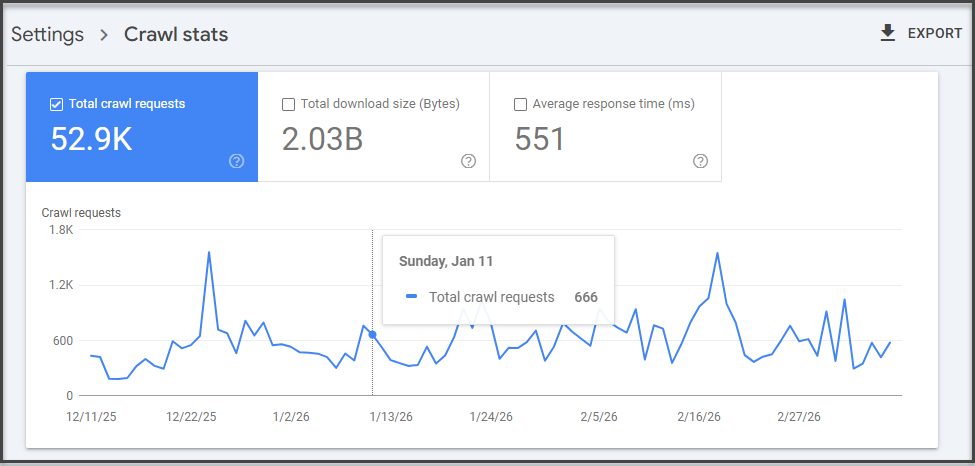
What you’re looking for here isn’t one magic metric. You’re looking for patterns.
If total crawl requests have dropped sharply, average response time has spiked, or host status shows availability problems, that’s your first sign something is off. Google specifically notes the report can help detect serving problems and availability issues encountered while crawling.
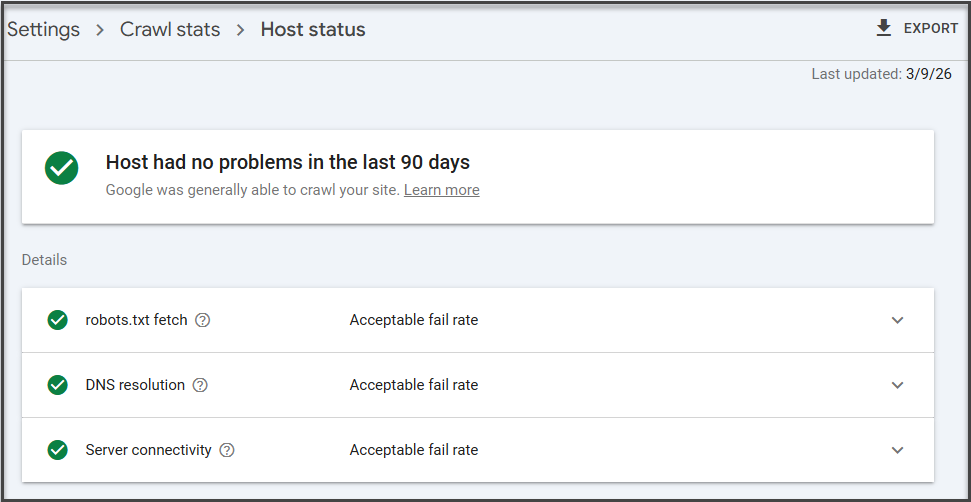
Step 2: Check Host Status First
Before you get lost in pretty charts, check Host status.
This is the part that tells you whether Google is having trouble accessing your website at the server level. If host status is unhealthy, you may not have a crawl budget problem so much as a “Google can’t reliably get in the front door” problem.
If you see issues here, those usually need to be addressed before anything else:
- Server availability problems
- Timeouts
- DNS issues
- robots.txt fetch failures
Google’s documentation explicitly recommends checking recent host availability in the Crawl Stats report when investigating server-related issues.
Step 3: Review the Crawl Request Trend
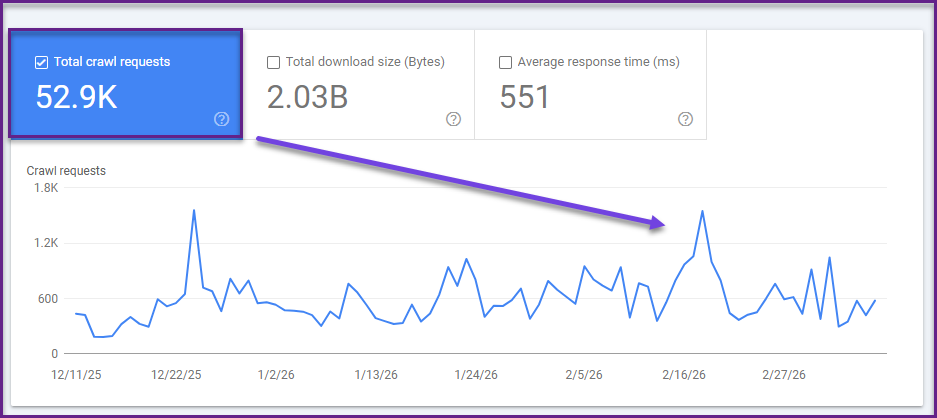
Now move to the main crawl requests chart.
This tells you how many crawl requests Googlebot is making over time. On its own, more crawl activity is not always good, and less crawl activity is not always bad. The point is to compare crawl activity to what’s happening on the site.
Ask:
- Did crawl requests drop after a migration?
- Did they spike after launching faceted navigation or a big filter system?
- Did they flatten even though you’re publishing lots of new pages?
If Google is crawling fewer pages while your site keeps growing, or if crawl activity suddenly jumps for no clear reason, that’s worth investigating.
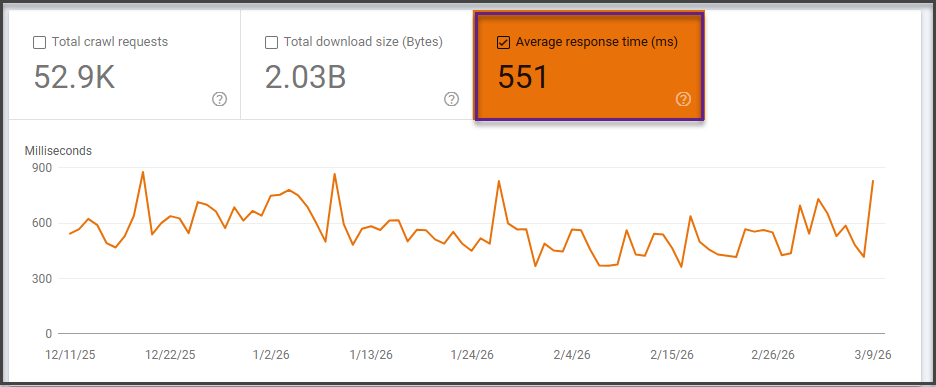
Step 4: Check Average Response Time
This is one of the most useful diagnostics in the report.
Google’s help documentation includes average response time because server performance directly affects how efficiently Googlebot can crawl. If your site is slow to respond, Google may reduce crawling to avoid overloading the server.
Look for:
- Sustained spikes in response time
- A correlation between slower response times and fewer pages crawled
- Large jumps after deployments, redesigns, or infrastructure changes
If the server is sluggish, crawl efficiency drops. Which means Googlebot may crawl fewer pages in the same amount of time.
That’s not a philosophical SEO issue. That’s just physics.
Step 5: Drill Into Response Codes
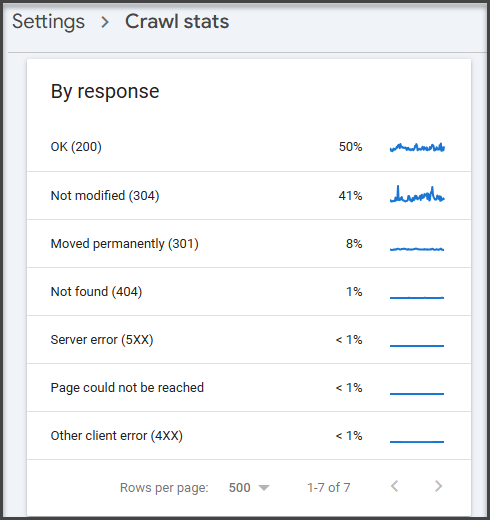
Next, open the crawl request breakdown by response.
This shows how many crawl requests resulted in:
- Successful responses
- Redirects
- Not found (404)
- Server errors
- Other crawl issues
This is where crawl budget waste becomes visible.
If Googlebot is spending a large share of requests on:
- 404 pages
- redirect chains
- soft 404s
- broken or legacy URLs
…then crawl activity is being spent on URLs that provide little or no SEO value. Google’s documentation also points to the crawl stats report when troubleshooting serving and crawling problems.
Step 6: Review Crawl Purpose
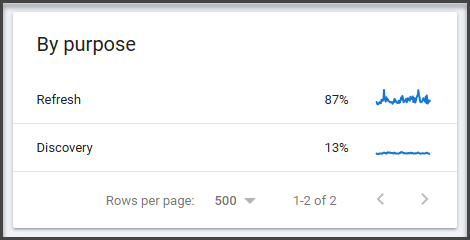
The crawl stats report also breaks down requests by crawl purpose, such as refresh or discovery crawls. This can help you understand whether Googlebot is spending more time refreshing known pages or discovering new ones. Google’s resources reference request categorization in crawl stats and related Search Console discussions.
This matters because a healthy site usually shows a mix:
- Discovery for new pages
- Refreshing important existing pages
If Google is barely discovering new pages, even though you’re publishing regularly, your internal linking, sitemap strategy, or crawl demand may need work.
If it’s spending huge effort rediscovering junk URLs, that’s a different problem.
Step 7: Check the Page Indexing Report Alongside Crawl Stats
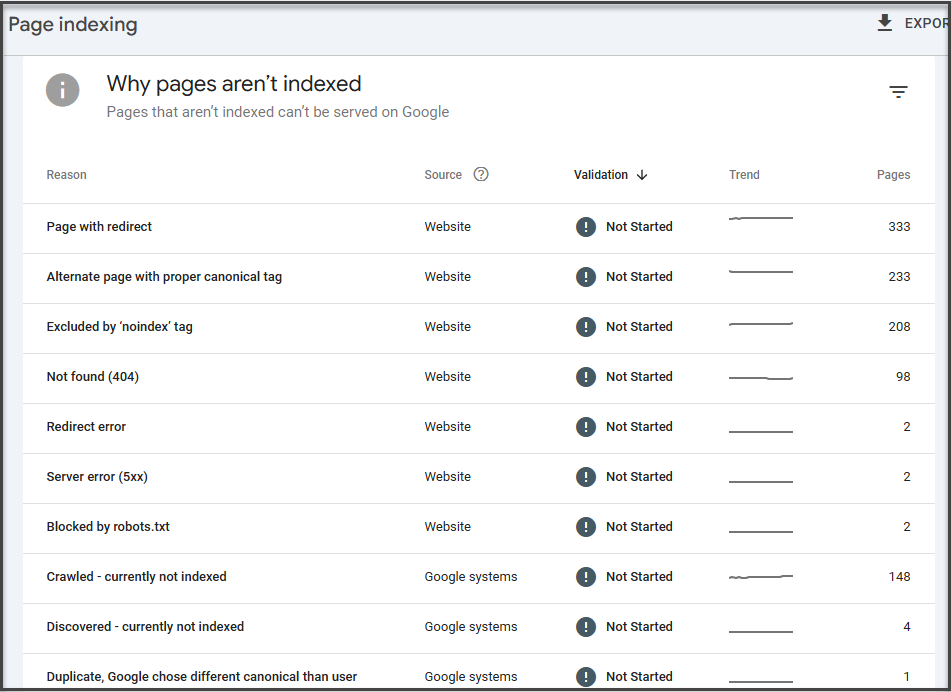
Google specifically recommends reviewing both the page indexing report and the crawl stats report because they provide different information.
So after reviewing crawl stats, go to:
Indexing → Pages
Now compare what you saw in crawl activity with what’s happening in indexing.
Look for:
- Large groups of pages in Discovered – currently not indexed
- High volumes of Crawled – currently not indexed
- Spikes in exclusions
- Unexpected not found or duplicate statuses
This is where crawl budget problems usually become obvious.
If Google knows the pages exist but isn’t crawling them efficiently, that points toward discovery or budget allocation issues. If it crawled them but chose not to index them, that shifts the diagnosis toward content quality, duplication, or canonicalization.
Step 8: Use URL Inspection on Specific Pages
Once you identify suspicious URLs or page groups, use the URL Inspection tool.
Google says the tool shows information about Google’s indexed version of a specific page, and it also lets you test whether a live URL might be indexable.
Use it to answer questions like:
- Has Google crawled this page recently?
- Is it indexed?
- Was it discovered but not crawled?
- Is the canonical Google selected different from the one you expected?
This is especially useful for:
- Newly published pages
- Important pages not appearing in search
- URLs stuck in indexation limbo
Log File Analysis
If Search Console is Google’s official press release, log files are the surveillance footage.
They show what Googlebot actually requested from your server: which URLs it hit, how often, when, and what response code it received.
This is where you stop inferring and start observing.
With log file analysis, you can answer questions like:
- Is Googlebot repeatedly crawling filtered URLs or low-value pages?
- Are important pages barely getting touched?
- Are broken pages receiving more crawl requests than they should?
- Are new pages being discovered quickly or ignored for days?
This is especially valuable on large websites, where crawl budget issues often get hidden by scale. A few thousand wasted requests on a small site might not matter. A few million wasted requests on a massive ecommerce platform definitely do.
The tradeoff is that log file analysis is more technical. It usually requires access to server logs and some comfort working with large datasets.
Still, if you manage an enterprise site and want the clearest picture of how Googlebot crawls it in the real world, this is the gold standard.
Side Note: This is why enterprise SEO teams love log files with the kind of intensity most people reserve for niche coffee grinders. They’re messy, technical, and wildly revealing.
Crawl Simulation Tools
Search Console and log files show how Google interacts with your site.
Crawl simulation tools show what your site structure looks like to a crawler before Google keeps wasting time on it.
Tools like Screaming Frog, Sitebulb, and similar crawlers can help you identify:
- Broken internal links
- Redirect chains
- Orphaned pages
- Excessive crawl depth
- Duplicate pages
- Thin or low-value URL sets
They’re especially useful for spotting structural problems that create crawl inefficiency, such as:
- Pages that are too deep in the site architecture
- Internal links pointing to redirected URLs
- Massive duplicate page clusters
- Parameter-generated crawl traps
These tools don’t replace Search Console or log files.
But they do help you see your website the way a crawler does: as a system of paths, signals, dead ends, and priorities.
And when crawl budget is the problem, that perspective is extremely useful.

How to Optimize Crawl Budget
Once you’ve identified crawl inefficiencies, the next step is crawl budget optimization.
But here’s where things get interesting.
Most crawl budget issues aren’t caused by one obvious problem. They’re usually the result of multiple technical factors interacting across the site: internal linking, duplicate URLs, crawl traps, server performance, and site architecture, all of which influence how search engines crawl pages.
Which means fixing crawl budget rarely involves flipping a single switch.
It usually requires technical SEO expertise, architectural changes, and careful analysis of how search engine crawlers interact with your site at scale.
The goal isn’t simply to increase crawl activity.
The goal is to ensure that search engines allocate their crawl resources to your most valuable pages.
Below are the most common areas SEO teams focus on when improving crawl efficiency.
Improve Internal Linking
Internal links act as pathways that guide search engine crawlers through your website.
When important pages receive strong internal links from relevant pages, search engines can discover them faster and prioritize them during crawling.
Poor internal linking structures often cause crawl inefficiencies. Important pages may be buried deep within the site architecture, while low-value pages receive excessive internal links.
Optimizing internal linking helps ensure search engine bots reach the pages that matter most.
This is why crawl budget optimization often overlaps with site architecture design and internal linking strategy.
Consolidate Duplicate URLs
Large websites frequently generate duplicate or near-duplicate URLs through parameters, filters, pagination, or CMS behavior.
Search engines may treat these as separate pages, which leads to repeated crawling of identical content.
When duplicate URLs exist at scale, they can quickly drain crawl activity.
Technical SEO teams typically address these issues by consolidating duplicate pages and clarifying the preferred canonical version of each URL.
This helps search engines focus on the correct pages rather than repeatedly crawling duplicates.
Manage Crawl Paths With Robots Directives
Not every page on a website needs to be crawled.
Large sites often generate internal search results pages, filtered URLs, faceted navigation paths, and other automatically generated pages that offer little SEO value.
Without guidance, search engines may spend crawl activity exploring these pages instead of focusing on important content.
Technical SEO teams often use directives like robots.txt rules, crawl management strategies, and parameter handling to reduce unnecessary crawling.
When implemented carefully, these controls help preserve crawl resources for priority pages.
Maintain XML Sitemaps Strategically
XML sitemaps help search engines discover important pages across your website.
But their real value lies in prioritization.
A well-maintained sitemap highlights key pages to be crawled regularly while excluding low-value URLs that may waste crawl activity.
For large websites, the sitemap strategy often becomes part of crawl budget optimization.
Search engines can use sitemaps as signals to focus their crawling on valuable pages that deserve indexing.

Improve Site Performance
Server performance has a direct impact on crawl efficiency.
If your website responds quickly, search engines can crawl more pages during each visit. Faster response times increase crawl capacity and allow search engine bots to request additional URLs without slowing the site.
But slow servers create the opposite effect.
High response times, server errors, or timeouts may cause search engines to reduce crawl activity to avoid overwhelming your infrastructure.
Improving server performance through faster hosting, CDN deployment, caching, and infrastructure optimization often significantly increases crawl efficiency.
Eliminate Technical Crawl Waste
Many crawl budget problems stem from technical SEO issues that waste crawlers’ time.
Common examples include:
- Broken pages and 404 errors
- Long redirect chains
- Infinite URL combinations
- Low-value thin pages
- Parameter-generated duplicate pages
When search engines crawl these URLs, they may stop before reaching more valuable pages.
Technical audits typically focus on identifying and removing these inefficiencies so search engine crawlers can navigate the site more efficiently.
Side Note: One of the biggest misconceptions in SEO is that crawl budget optimization is about increasing crawl budget. In reality, it’s about increasing crawl efficiency. A well-optimized site helps search engines crawl the right pages first, which means new or updated content can appear in search results faster, even if the total crawl budget stays the same.
Crawl Budget Optimization Is a Technical SEO Discipline
Crawl budget optimization often touches multiple systems at once: site architecture, infrastructure, CMS behavior, canonicalization rules, and crawl management directives.
For large websites, changes made in one area can have unexpected ripple effects across the entire crawl ecosystem.
Blocking the wrong URLs, misconfiguring canonical tags, or altering site architecture without careful analysis can create bigger problems than the ones you were trying to solve.
That’s why crawl budget optimization is typically handled as part of a comprehensive technical SEO strategy rather than a set of isolated fixes.
Diagnosing the issue is one thing.
Resolving it safely across thousands—or millions—of URLs is something else entirely.
Common Crawl Budget Myths
Crawl budget is one of those SEO topics that attracts a surprising amount of misinformation.
Partly because Google doesn’t publish an exact formula. Partly because technical SEO conversations tend to spiral into theory faster than you can say “log file analysis.”
The result? A lot of advice that sounds convincing… but doesn’t actually hold up.
Let’s clear up a few of the most common crawl budget myths.
“Submitting a Sitemap Increases Crawl Budget”
Submitting an XML sitemap does not magically increase crawl budget.
Google’s crawlers don’t see a sitemap and suddenly think, “Ah, yes, this website deserves more resources.”
What a sitemap actually does is help search engines discover and prioritize important URLs more efficiently.
A well-maintained XML sitemap serves as a roadmap that highlights which pages matter most. It helps search engines find new or updated pages quickly and ensures important URLs don’t get buried inside complex site architecture.
But the sitemap itself doesn’t increase the amount Google crawls of your site.
It simply helps Google crawl more intelligently.
“Noindex Saves Crawl Budget”
This one trips up a lot of site owners.
Adding a noindex directive tells search engines not to include a page in search results. But it does not prevent the page from being crawled.
Search engine crawlers still need to access the page in order to see the noindex directive.
Which means the page still consumes crawl activity.
If your goal is to reduce crawl waste, blocking low-value pages from crawling entirely often requires different technical solutions.
Noindex controls indexing.
It doesn’t necessarily control crawling.
“Blocking URLs Always Improves Crawling”
Blocking URLs in robots.txt can help preserve crawl budget in some situations.
But done incorrectly, it can create bigger problems.
If important pages are accidentally blocked, search engines may struggle to understand the site structure or discover valuable content. Blocking URLs also prevents Google from seeing canonical tags or other signals that might help consolidate duplicate pages.
In other words, crawl controls require precision.
Blocking URLs blindly is a bit like trying to fix traffic congestion by closing random roads.
Sometimes it works.
Sometimes it creates a much bigger mess.
Side Note: Most crawl budget myths stem from trying to solve crawl efficiency with a single tactic. In reality, crawl budget optimization usually involves multiple technical factors working together: site architecture, internal linking, canonicalization, server performance, and crawl path management.
The Future of Crawl Budget in a Search Everywhere Optimization™ World
Crawl budget isn’t going away.
If anything, it’s becoming more important.
But the context around crawling is changing.
For years, SEO discussions treated crawling as a purely Google-centric problem. The goal was simple: help Googlebot crawl and index your website efficiently so your pages could appear in Google’s search results.
That model is evolving.
Today, visibility across the internet increasingly extends beyond traditional search engines. Platforms such as social networks, marketplaces, knowledge graphs, and generative AI systems are ingesting, interpreting, and redistributing information in different ways.
This shift is at the heart of Search Everywhere Optimization™.
Instead of optimizing only for a single search engine, modern SEO strategies focus on building discoverability across multiple platforms where users search, discover, and consume information.
But here’s the interesting part.
All of those systems still rely on structured information and crawlable content.
Search engines still need to crawl web pages to understand entities, relationships, and content relevance. AI systems still depend on accessible content to generate answers. Knowledge graphs still rely on structured data extracted from web pages.
Which means crawlability remains a foundational layer of digital visibility.
If search engine crawlers struggle to efficiently explore your site, it doesn’t just affect traditional rankings.
It can affect how your content is discovered, interpreted, and surfaced across a growing ecosystem of search experiences.
In a Search Everywhere Optimization™ world, crawl efficiency becomes part of a broader goal: ensuring your content is discoverable wherever search happens.
The fundamentals haven’t changed.
Search engines still crawl the web.
But the implications of crawl visibility are expanding.

Crawl Budget Optimization Checklist
While crawl budget optimization can involve complex technical work, the core principles are relatively consistent.
Most effective strategies focus on improving crawl efficiency by helping search engines prioritize important pages and avoid wasting crawl activity.
Key areas typically include:
- Maintaining strong internal linking structures so search engines can easily discover important pages.
- Eliminating duplicate URLs that create multiple versions of the same content.
- Fixing broken pages and redirect chains that waste crawl resources.
- Improving site speed and server performance to help search engine bots crawl pages faster.
- Managing low-value URLs generated by filters, parameters, or internal search pages.
- Maintaining accurate XML sitemaps to highlight important pages.
- Monitoring crawl stats and crawl errors regularly to identify emerging issues.
For smaller websites, these best practices are often sufficient.
For large or complex websites, crawl budget optimization becomes a more advanced technical discipline that involves infrastructure, architecture, and crawl path management.
Final Thoughts
Crawl budget is one of those SEO concepts that sound abstract until they start affecting your site.
When Google crawls your most important pages efficiently, new content gets indexed quickly, and updates appear in search results faster.
When crawl activity gets wasted on duplicate URLs, broken pages, and endless parameter variations, important content can sit undiscovered—even if it deserves to rank.
For most small websites, this isn’t something to lose sleep over.
But as websites grow larger and more complex, crawl efficiency becomes an increasingly important part of technical SEO.
Because search engines don’t crawl everything.
They prioritize.
And ensuring the right pages receive that attention can make a meaningful difference in how quickly your content appears in search.
Want Expert Help Optimizing Your Crawl Budget?
Diagnosing crawl budget issues is one thing.
Fixing them safely across thousands of URLs is another.
At SEO Sherpa, our technical SEO specialists help businesses identify crawl inefficiencies, optimize site architecture, and ensure search engines crawl the pages that actually matter.
If your website is growing rapidly, or you suspect crawl budget may be limiting your search visibility, our team can help.
Book a free discovery call, and we’ll review your site’s crawl health, technical SEO performance, and opportunities for improvement.
Because when search engines crawl your site efficiently, everything else in SEO starts working better.
















Leave a Reply