


Short-form videos are dominating feeds. But are yours discoverable?
YouTube Shorts has exploded, racking up over 5 trillion views and counting. But here’s the catch: creating a viral 30-second clip is only half the battle. If your Shorts aren’t optimized, they might vanish into the algorithmic void—never to be seen in search, suggested videos, or even your own subscribers’ feeds.
That’s where YouTube Shorts SEO comes in.
Just like with YouTube SEO for long-form content, Shorts need a strategy.
Whether you’re a new Shorts creator or a seasoned YouTuber pivoting to short-form, this guide will show you how to make your vertical videos work smarter, not just harder.
Let’s break down how to get your Shorts found, watched, and ranked in both YouTube and Google search.
Article Summary
- YouTube Shorts SEO is real and essential. Shorts appear in YouTube search, Google results, and the Shorts feed, but only if they’re properly optimized with the right keywords, structure, and engagement cues.
- The Shorts algorithm is unique. It favors watch time, viewer retention, and engagement, not just keywords. Fast hooks and high replay value matter more than ever.
- Optimization steps include: writing keyword-rich titles, adding natural descriptions, using #Shorts and relevant hashtags, crafting thumbnails, and encouraging interaction.
- YouTube Analytics and SEO tools are your best friends. Use platforms such as YouTube Studio, TubeBuddy, and VidIQ to refine your strategy based on real performance data.
Why SEO for YouTube Shorts Matters
YouTube Shorts aren’t just a shiny new content format. They’re a search discovery machine hiding in plain sight.
Until recently, most Shorts creators assumed their videos lived and died in the Shorts feed. You’d post something catchy, hope it landed on a few screens, and move on. But what many haven’t realized is that Shorts are now woven into YouTube’s broader ecosystem, including search results on both YouTube and Google.
And that changes everything.
Shorts can now show up in YouTube search, Google’s video carousels, and even recommended sections alongside long-form videos. If someone types a relevant query into the YouTube search bar, your Short could be the first thing they see. That’s only possible if YouTube understands what your video is about. And that understanding starts with SEO.
Google’s evolving AI-powered results also pull in vertical video content, meaning Shorts can surface in zero-click summaries or AI Overviews. It’s a quiet but major shift. Your short-form content is competing in the same search spaces as web pages and blog posts, which means metadata like your title, description, and even your hashtags are more important than ever.
And here’s where it gets interesting: YouTube doesn’t just show Shorts to subscribers. It pushes them to completely new audiences through recommendations and feeds. That makes Shorts a powerful discovery tool, especially for creators trying to grow without a massive following.
But discovery only happens when the algorithm knows your video is worth showing. So if you skip the SEO basics, such as crafting a relevant title or including search-friendly language in your description, you’re relying entirely on luck. In a space this competitive, that’s a losing bet.
The bottom line? Optimizing your Shorts is no longer optional. It’s how you earn your spot in the search results, build consistent views, and turn quick clips into long-term traffic.
How the YouTube Shorts Algorithm Works
The Shorts algorithm doesn’t play by the same rules as regular YouTube SEO. If you try to optimize your Shorts the same way you would a ten-minute video, chances are you’ll be buried beneath creators who know how the system actually works.
What matters most for Shorts is how people interact with them.
That means the algorithm cares less about the perfect keyword and more about what happens once someone starts watching. If a viewer sticks around, replays the clip, likes it, shares it, or leaves a comment, those actions send a clear signal to YouTube. This video is worth showing to more people.
That’s why the first few seconds of a Short are so critical. You don’t get a 15-second intro. You don’t even get five. Most viewers decide whether to keep watching within the first two seconds. Hook them fast, or they’re gone.
Watch time plays a major role, too, but with Shorts, it works a little differently. Instead of measuring how long someone watches in total, YouTube looks at the percentage of the video that gets viewed. If your video is 20 seconds long and people watch all the way through, perhaps even replaying it, that’s a strong signal. Shorts that get rewatched tend to perform especially well because replays show high engagement without needing extra duration.
Titles and descriptions still matter, but their role is more about discoverability than ranking. YouTube needs context to know where your video fits, and metadata helps with that. However, once the video is shown, it’s engagement that decides whether it continues to spread.
The Shorts algorithm is also separate from the one powering long-form videos. It has its own recommendation engine tuned specifically to fast content and swipe behavior. You might have a regular video underperform while a Short from the same channel takes off. That’s not a glitch. It’s two different systems measuring two different kinds of viewer behavior.
Unlike traditional search-driven discovery, the Shorts system leans heavily on machine learning to anticipate what people want to watch next. It doesn’t just look at what the video says; it also tries to understand how viewers respond. That’s why creators who optimize only for keywords often get outpaced by those who focus on pacing, storytelling, and audience engagement.
In short, the algorithm doesn’t care what your video is about until it knows people are watching it. And it won’t keep showing your video unless they stick around.
Step-by-Step: How to Optimize Your YouTube Shorts for SEO
If you want your Shorts to rank in search, show up in feeds, and actually drive traffic, you can’t just hit upload and hope. Every part of your Short, from the title to the pacing, sends signals to YouTube and Google about what the video is, who it’s for, and whether it’s worth recommending.
This section breaks down exactly how to optimize each element of your Short to give it the best shot at visibility and performance.
Let’s start at the top, with your title.
Craft a Compelling Title With Keywords
The title of your Short is one of the only text elements that YouTube’s systems and users see right away. That makes it your first shot at relevance.
The best titles use natural language, echoing how people actually search. Think less like a headline and more like a question someone might type into the search bar. “How to frost a cake in 30 seconds” is far more searchable than “Cake Goals.” You want to match search intent, not just grab attention.
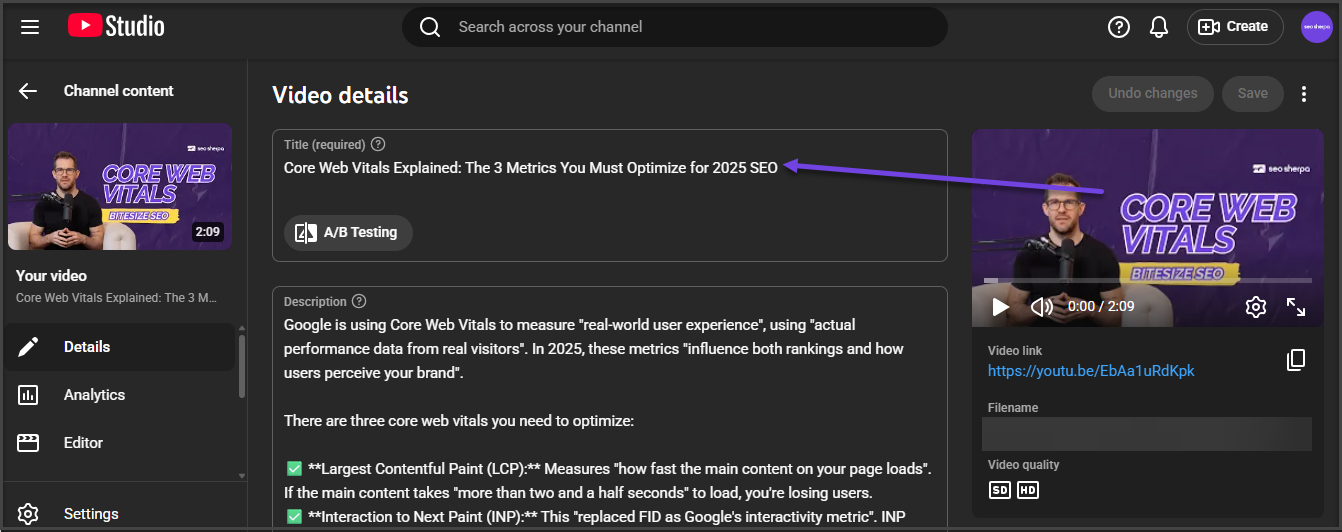
And yes, keywords matter. But not at the expense of clarity. Include your primary keyword early in the title, ideally within the first few words, and keep the total length around 40 to 50 characters. Shorter titles tend to display better across devices, especially in the Shorts tab and on mobile screens.
It’s also smart to experiment. Try posting similar videos with slight title variations and watch which one ranks higher or gets more views. YouTube’s algorithm learns from performance, so small changes can make a big difference.
Write a Descriptive Video Description
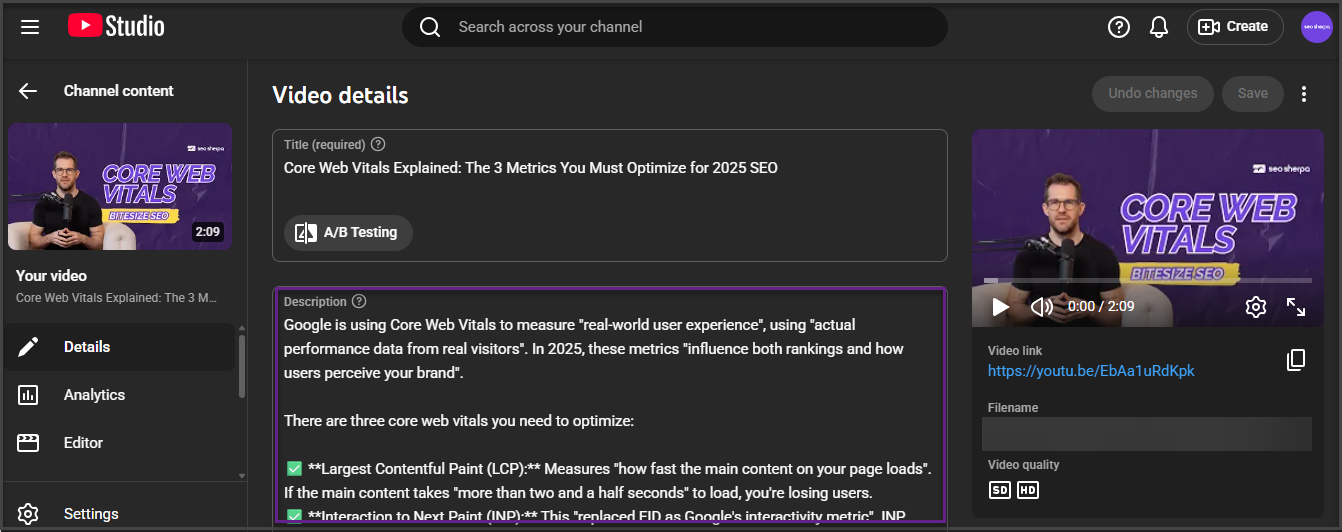
The description box is your chance to give YouTube (and Google) more context about your video and who it is for.
Write one or two short paragraphs that summarize the video naturally. Avoid keyword stuffing, but do mention key phrases that reflect what people might be searching for. YouTube pulls from this text when indexing your Shorts for both its internal search and external platforms like Google.
You can also use this space to include a call to action, whether it’s encouraging viewers to subscribe, watch a related video, or check out a link. And don’t forget to include a few hashtags at the end, especially #Shorts, which tells YouTube to classify your video as part of its Shorts ecosystem.
Video descriptions don’t need to be long, but they do need to be intentional. A vague one-liner won’t help you rank.
Add Strategic Hashtags
Hashtags are one of the clearest discovery signals you can give YouTube. They categorize your video and help it show up in the right feeds and searches.
Always include #Shorts to ensure your video is properly indexed as a Short. Beyond that, look for trending or niche-relevant tags that match your topic. For example, a fitness video might include #HIIT or #QuickWorkout, while a tech tip could use #iPhoneTricks.
What you don’t want is a wall of unrelated or overly broad tags. That can actually confuse the algorithm and reduce visibility. Three to five focused hashtags are usually the sweet spot.
Hashtags also play a subtle role in cross-platform discoverability. If you’re repurposing your Shorts on TikTok or Instagram Reels, using similar tags helps build continuity and makes your content easier to find.
Choose the Right Thumbnail (If Applicable)
While most Shorts autoplay in the feed, thumbnails still matter—especially in search results, on your channel page, and in suggested videos.
If YouTube lets you choose a custom thumbnail for your Short (or you’re uploading it manually), treat it like a visual headline. Use bold, high-contrast visuals with clear text overlays. Think of it as a mini billboard that has to catch attention in half a second.
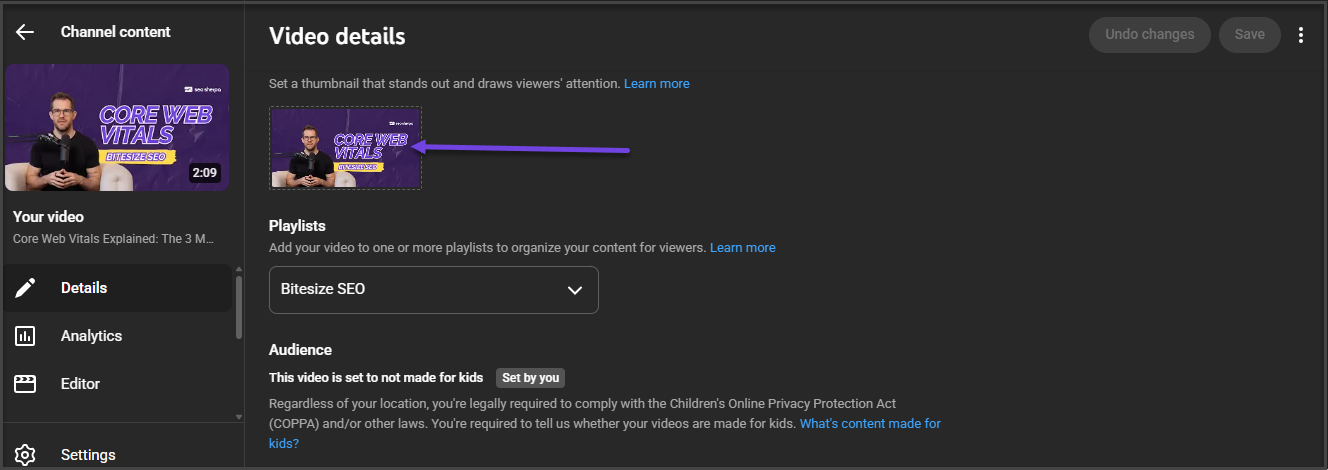
Even though thumbnails don’t drive click-through rate in the Shorts feed itself, they do influence performance everywhere else. And if your Short goes viral or gets embedded on other platforms, the thumbnail becomes part of the experience.
Shorts optimized with strong thumbnails tend to perform better outside the feed, especially in Google’s video carousel, where a clear image can mean the difference between a view and a scroll-past.
Optimize for Retention and Engagement
Retention is the heartbeat of the Shorts algorithm. If people swipe away too soon, YouTube stops showing your video. But if they stay, replay, or interact, your Short gets more reach.
That means the first 1–2 seconds are everything. Start with action. No intros, no fade-ins, no logos. Open with a question, a surprising visual, or a bold statement that hooks the viewer before they even think about swiping.
You also want to end strong. A clear call to action, like “Comment your favorite,” “Follow for more,” or “Try this and tag me,” can drive likes, shares, and interaction, all of which tell the algorithm your content is worth spreading.
Pacing matters, too. Shorts that move quickly and deliver value without fluff hold attention better. If your video feels slow, even at 30 seconds, viewers won’t wait around. Keep things tight, intentional, and built for replays.
How to Get Your Shorts Indexed by Google
YouTube may be the second largest search engine, but Google is still the first. That means showing up in Google search results can drive a massive wave of views to your Shorts, especially if your video gets featured in the video carousel or appears in a related query via AI-generated overviews.
But here’s the twist most Shorts creators miss: indexing doesn’t happen automatically.
Google crawlers still need help finding and understanding your Shorts. Unlike traditional blog content, Shorts don’t always come with the same structured context. And since they live on YouTube rather than your own site, you’ve got to do a bit more to make them visible beyond the app.
One of the most effective ways to help your Shorts get indexed is to embed them in relevant playlists.
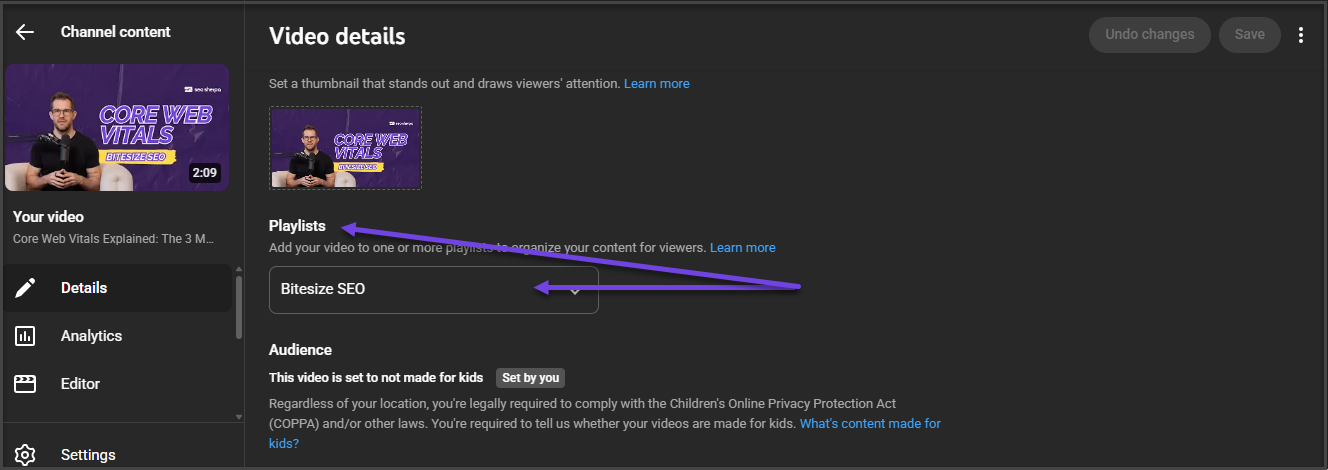
Google recognizes playlists as thematic collections, and that structure makes it easier for the search engine to understand what the video is about. Including a few well-optimized Shorts in a tightly themed playlist can boost their visibility in search engines and increase their odds of appearing alongside other top-ranking videos.
Embedding your Shorts on your website is another smart move. If your site includes articles or landing pages related to the video’s content, adding Shorts with contextual copy helps Google tie the videos to real web content. That, in turn, increases trust and discoverability.
Want to take it even further? Add captions or a full transcript to your video’s page. Google can’t “watch” video the way humans do, but it can crawl text. Captions give it something to read. Better still, they improve accessibility and boost user experience, both of which Google loves.
There’s also the matter of structured data. If you’re embedding Shorts on your site, use schema markup to define the video content explicitly. The VideoObject schema can include the title, description, upload date, and even the duration of your Short. This gives Google a cleaner, more complete picture of what your content is and makes it easier to rank in rich snippets or carousels.
Indexing might not be as flashy as going viral, but it’s how you get consistent, long-term visibility. A well-optimized Short, embedded on a site with schema, surrounded by relevant keywords and supporting content, has the potential to show up not just in feeds, but on the front page of Google.
And that’s when Shorts go from momentary entertainment to meaningful traffic drivers.
Common SEO Mistakes to Avoid With YouTube Shorts
Optimizing YouTube Shorts isn’t just about what you do; it’s also about what you don’t do. Certain habits can quietly sabotage your reach, wreck your watch time, or send mixed signals to the algorithm. And the worst part is that most creators don’t even realize they’re making these mistakes.
Let’s break down the most common pitfalls and how to fix them.
Using Clickbait Titles With Poor Watch Time
Clickbait might grab attention, but if your title overpromises and the video underdelivers, the algorithm takes note. YouTube prioritizes retention and satisfaction. If viewers bounce after two seconds, your Short gets buried quickly.
This is especially dangerous in the Shorts feed, where videos autoplay and users swipe without hesitation. If your title says “Insane iPhone Trick You’ve Never Seen” and it’s just a brightness tip, expect a high drop-off rate and low replay value. That combination tanks performance, even if the video racks up a few early clicks.
Instead, focus on alignment. Create titles that are exciting but honest, using natural language and keywords that match what the viewer will actually see. When titles and content sync, watch time goes up, and so do your chances of ranking in YouTube search results.
Not Writing a Description
The description box is your SEO cheat code, so skipping it is like handing YouTube a video with no context.
When creators leave the description box blank or toss in a vague sentence like “Watch till the end,” they miss the chance to include keywords, hashtags, and relevant terms that help the algorithm understand what the Short is about. Even more importantly, a solid description increases the chance of your video being picked up in Google search results, especially when paired with hashtags like #Shorts.
A well-written description should summarize the video content, mention a few target keywords, and include a call to action. One to two short paragraphs is enough. And if you’re posting consistently, consider adding a branded tagline or social links to keep the structure familiar to returning viewers.
Overusing Irrelevant Hashtags
Hashtags help YouTube categorize your Shorts. But when they’re overused or misused, they can do more harm than good.
Dumping 15 random hashtags at the end of your description might seem like a visibility play, but it dilutes your topical relevance. YouTube’s algorithm looks for contextual signals, and if your Shorts include tags like #TikTok, #cats, and #gaming all at once, but it isn’t really about any of those things, it confuses the system and weakens your SEO.
Stick to 3–5 focused hashtags that reflect the video’s actual topic. Always include #Shorts, then add niche or trending tags that align with your target audience. This keeps your content clean, relevant, and more likely to show up in the right feeds and search results.
Think quality over quantity. Hashtags are a sorting mechanism, not a magic spell.
Ignoring Engagement Cues
Shorts aren’t just meant to be watched; they’re supposed to spark action. Yet many creators forget to ask for anything at all.
Calls to action like “Comment your favorite,” “Tag a friend,” or even a simple “Hit like if this helped” can drive the interaction the algorithm loves. Engagement boosts visibility. More importantly, it signals to YouTube that your content is worth recommending.
If your Short ends abruptly or feels like a one-way broadcast, viewers are less likely to respond. That leads to lower watch time, fewer comments, and weaker performance across the board.
Even something as small as “What would you try next?” can turn passive watchers into active participants. The key is prompting interaction without sounding forced. Keep it conversational, relevant, and short just like the video itself.
Pro SEO Tips to Boost Your Shorts Ranking
Once you’ve nailed the fundamentals, it’s time to go further. These advanced strategies help you fine-tune your approach, work smarter with your existing content, and squeeze out every ounce of visibility from each upload.
If you’re serious about ranking in YouTube search results, and even in Google search results, these are the pro moves that make a real difference.
Repurpose High-Performing Content Into Shorts
You don’t need to reinvent the wheel with every Short. Some of the most successful creators are simply repackaging their best content into a vertical format.
Got a blog post that ranks well for a competitive term? Turn the main tip into a 30-second tutorial. Have a long-form YouTube video with a strong watch time? Cut the punchiest moment into a Short.
Repurposing gives you more reach with less effort. And because the original content is already proven to resonate, your chances of success go way up. This tactic also supports topic clustering, where short-form videos support broader themes on your YouTube channel.
And from an SEO standpoint, it’s smart. If your blog post or main video is already targeting the right keywords, a supporting Short strengthens that topical authority across platforms.
Use YouTube Analytics to Refine SEO Strategy
YouTube Studio isn’t just for checking views. It’s also your roadmap to better performance.
The Audience tab shows when your viewers are online, helping you post Shorts at optimal times to drive early traction. Meanwhile, the Retention and Engagement graphs show you exactly where viewers are dropping off, and where they’re hooked.
But the real SEO gold lies in the Traffic Source: YouTube Search section. This tells you which search terms are leading people to your videos. If you spot a high-performing phrase, use it to guide your next title or description. Over time, you’ll start to see patterns that help you refine your content strategy and double down on what works.
Creators who treat analytics like a feedback loop are the ones who rank consistently.
Leverage Pinned Comments With Keywords and CTAs
Most creators overlook pinned comments, but they’re prime SEO and engagement real estate.
When you pin a comment under your Short, you’re adding an extra piece of indexable text. It’s a subtle but effective place to include target keywords, reinforce the topic, or drop a relevant CTA.
For example, if your Short is about a Google Sheets trick, a pinned comment could say: “Want more quick Google Sheets tips? Check the full tutorial here [link]” or “This is one of my favorite spreadsheet hacks, what’s yours?”
This not only boosts interaction but also gives YouTube’s algorithm more context about the video. Plus, pinned comments often show up even when Shorts autoplay in the feed, adding an extra layer of engagement without any extra video editing.
Think of it as bonus SEO, baked right into the comment section.
Shorts SEO Is Different, But Powerful
Optimizing YouTube Shorts is not the same as optimizing longer videos, and that is exactly why it works.
Shorts live in a fast, scroll-heavy environment where attention is won or lost in seconds. The algorithm responds less to keywords and more to how people behave. It wants content that gets rewatched, shared, and talked about. That means your job is not just to show up in search, but to hold attention once you do.
This is where real strategy makes the difference.
A Short that ranks is not just well-edited. It is structured around clear search intent, written with target keywords in mind, and paced to maintain strong watch time. It speaks to a specific target audience, solves a problem quickly, and invites viewers to take action. Done right, it becomes part of a much larger visibility engine that includes YouTube, Google, and beyond.
Shorts may be brief, but they are far from small. For creators and brands willing to optimize strategically, they offer a direct line to new viewers and long-term growth.
Need help building a Shorts SEO strategy that actually drives results? Book a discovery call with SEO Sherpa and let’s map out your path to more views, better rankings, and lasting visibility.
















Leave a Reply